Hotels: reception to maintenance
A guest in room 312 reports a dripping tap at 22:00. Your rules turn the escalation into a task for maintenance, and the technician gets it on WhatsApp with its deadline.
Your rules turn a guest's message into a task for the right person, and once it is closed, UpMarket's AI tells the guest in the same conversation.
Guest request
 WhatsAppApartment 204
Escalation
1 of 1 task done
Task
Your rules turn the escalation into a task and assign it to Pedro
Pedro is notified on WhatsApp · 09:15
1 photoClosed in the staff portal · 10:38
Guest update
WhatsAppApartment 204Sent when the task was closed
The guest confirmed, and the escalation closed · 10:49
The problem
A guest reports a problem on WhatsApp or Booking.com. Someone reads it, finds out who is on maintenance today, passes the details on in a group chat, checks later whether the job was done and goes back to the conversation to tell the guest. Even when the AI answers the first message, that coordination is still done by hand, in apps that know nothing about the booking or about each other.
How it works
On WhatsApp, Airbnb, Booking.com or email, in their own language. The message arrives in the unified inbox, in the conversation for that booking.
The AI virtual concierge replies to the guest and files an escalation with a category, such as maintenance, and a priority. Your escalation rules decide who on the team is alerted.
The escalation becomes a task by the rules you set, starting from its category and property; the guest's message is not copied into it. Your team can also create a task, or link an existing one, by hand.
The rules assign the task to a staff member or supplier, with a deadline, and they are notified on WhatsApp with a personal link. Team members are notified in the unified inbox.
The staff member opens the task on their phone, starts it and closes it with photos. The task keeps a history of every change.
Once the task is closed, UpMarket's AI tells the guest in the same conversation, from what was recorded on the task, so nobody has to remember the last message.
The escalation closes when the guest confirms the problem is solved, or once its tasks are done if you set it that way. Closing one by hand while tasks are still open asks for confirmation first.
One guest issue can need several tasks, and one task can cover several issues: an escalation lists each of its tasks, and a task lists every escalation it belongs to.
In the unified inbox
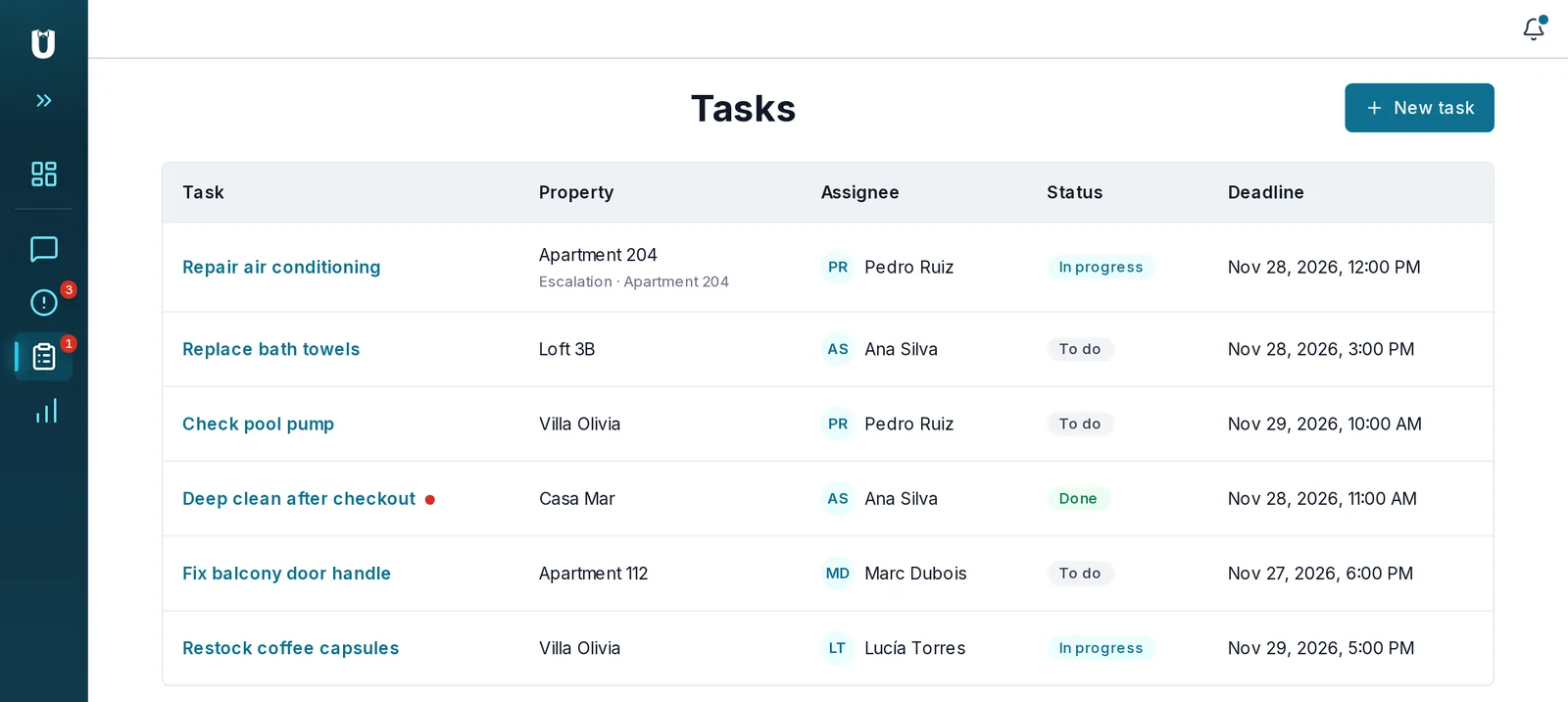
Tasks have their own tab in the unified inbox, beside conversations and escalations. Your rules create them from escalations, and your team can create a task for any other job: a bulb to replace, a pool pump to check, towels to restock.
Staff portal
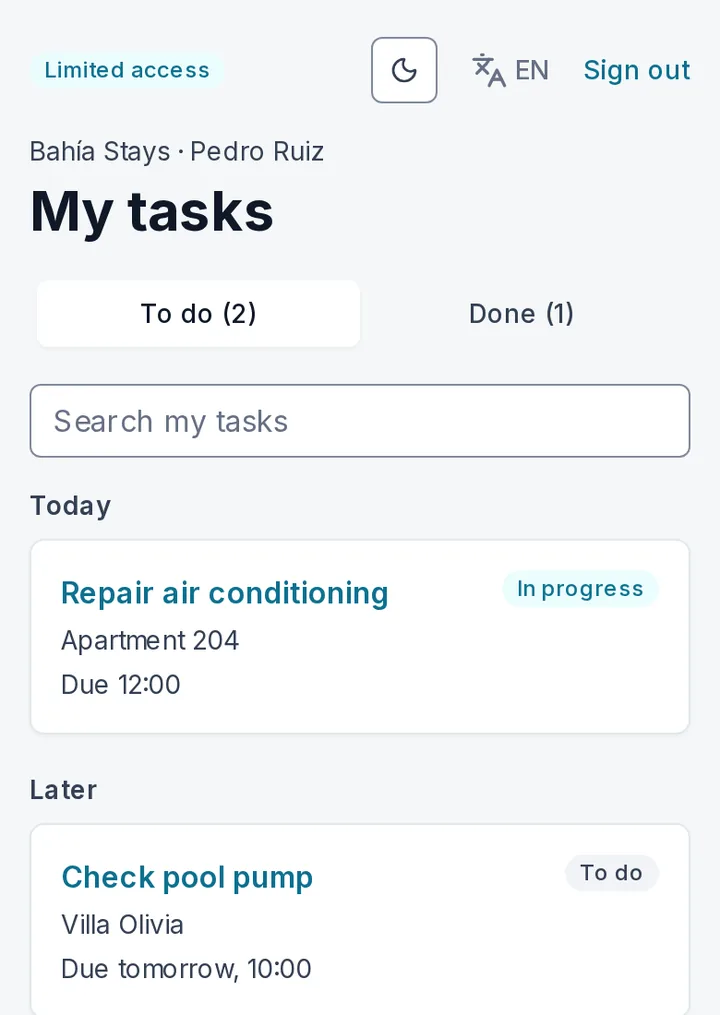
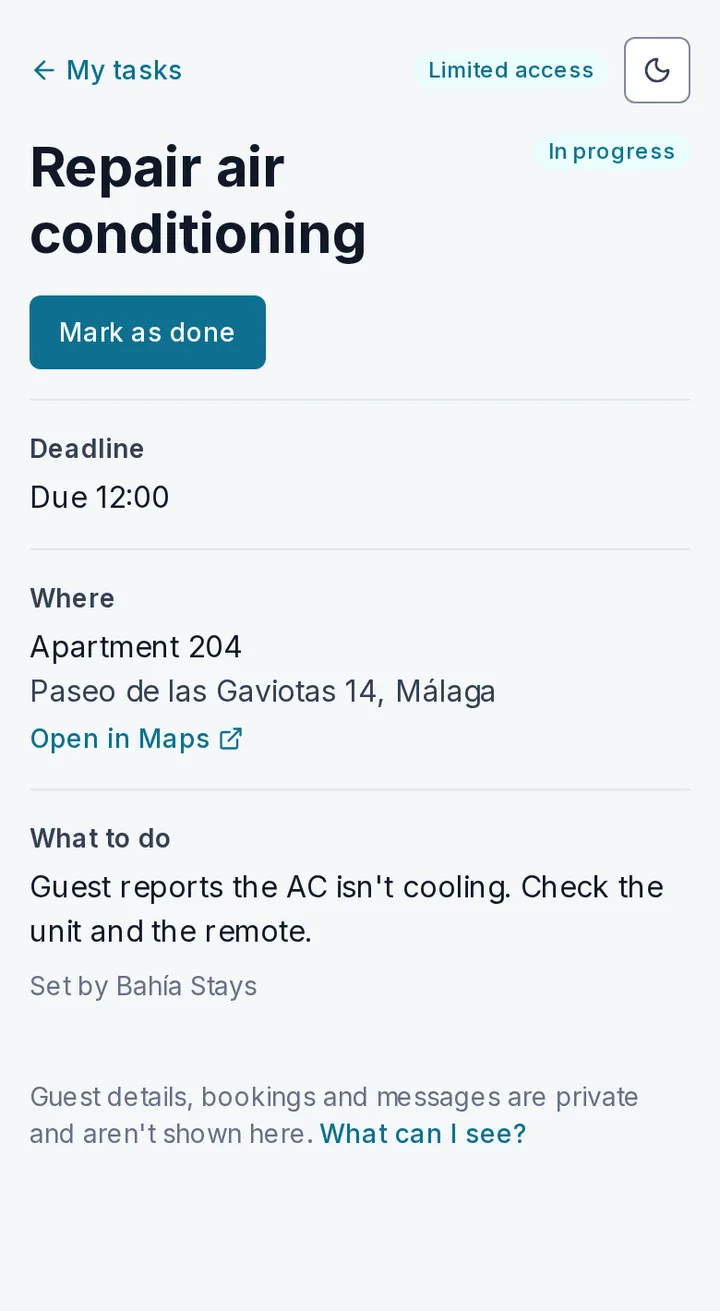
Each staff member gets their tasks on WhatsApp, with a personal link. It opens the staff portal in the phone's browser, with nothing to install and no password, and shows what to do, where and by when.
In the demo we'll show you:
Your own systems
Coming nextMany operators already coordinate housekeeping and maintenance in their PMS or in a dedicated operations tool, and some PMSs have task modules of their own. UpMarket is adding connections to supported operational systems: the task created from a guest request will go to the system your team uses, and its completion will come back to the escalation in UpMarket. Until then, tasks are managed in UpMarket, and each system will be named on this page once its connection is released.
Guest request
WhatsApp, Airbnb, Booking.com or email
UpMarket
The conversation, the booking and the escalation in one place
In UpMarket
In your own systemComing next
Work completed
UpMarket's AI tells the guest
The escalation closes when the guest confirms, or as you set it
Guest updates
Your technician finishes the repair and closes the task with a photo. UpMarket's AI then writes to the guest in the conversation where the problem was reported, from what was recorded on the task, and the escalation closes when the guest confirms, or as you set it. The AI passes on the recorded outcome; it does not inspect the repair itself.
Guest request
The air conditioning isn't working
Task
Repair air conditioning · assigned to Pedro by your rules
Done
Closed with a photo in the staff portal · 10:38
Guest update
The AI tells the guest, and the escalation closes when they confirm · 10:49
Hotels and vacation rentals
A guest in room 312 reports a dripping tap at 22:00. Your rules turn the escalation into a task for maintenance, and the technician gets it on WhatsApp with its deadline.
Extra towels or a cot become a task for housekeeping, and the guest is told in the conversation once it is done.
Open tasks stay in the list with their assignee and deadline, and overdue ones are flagged, so the next shift starts from the same list.
Housekeeping and maintenance see the room and the job in the staff portal, never the guest's name, booking or messages.
Each task carries its property, so a technician working across town knows which apartment it is and opens the address in Maps.
Each gets their tasks on WhatsApp with a personal link, with nothing to install, and closes them with a photo on site.
When a guest can't get in and needs someone there, the escalation becomes a task for the person your rules name for that hour, with a deadline a few minutes away.
No coffee, or a hairdryer gone: the request becomes a task for the cleaner, who closes it with a photo once it is restocked.
The platform
Answers guests in their language on WhatsApp, Airbnb, Booking.com and email, and escalates what needs a person.
Every channel in one conversation per booking, where your team works its escalations and tasks.
Guests check in before they arrive, with a scanned passport or ID card. More than 70% of guests do.
Every guest is filed with the authorities within 24 hours of arrival.
Balances and tourist tax collected, and the deposit held on the card for 30 days, through Stripe.
The door code goes out only once check-in is complete.
Extras offered in the conversation and paid in the guest app.
More on each: AI virtual concierge · Unified inbox · Online check-in · Guest registration · Payments and deposits · Keyless entry · Upsells
Software for assigning and tracking the work that keeps a hotel or vacation rental running: repairs, cleaning, restocking and guests' requests. In UpMarket, tasks sit in the unified inbox beside guest conversations and escalations, so a task can start from a guest's message and the team can see when it is done.
Yes. When the AI virtual concierge escalates a guest's request, your rules turn the escalation into a task with a property, an assignee and a deadline, and your team can also create or link one by hand. The assignee is notified on WhatsApp and closes the task with photos, and the AI tells the guest.
Yes. Any job can be a task, created from the Tasks tab whether or not a guest asked for it: a repair spotted during a cleaning, or supplies to restock.
Yes. Staff get their tasks on WhatsApp with a personal link to the staff portal and see only the tasks given to them: what to do, where and by when. Guests' names and contact details, bookings, prices, messages, escalations and other staff members' tasks are never shown. They can start a task and close it with photos; only your team changes anything else.
Yes. Each task belongs to a property imported from your PMS, and the Tasks list shows every task's property, assignee, status and deadline across your portfolio. Overdue tasks notify the people responsible.
Through the escalation. The guest's message arrives in the unified inbox, the AI virtual concierge answers and escalates what needs a person, your rules turn the escalation into a task, and once the task is closed the AI tells the guest in the same conversation. The escalation closes when the guest confirms, or as you set it.
Yes. Once a task is closed, UpMarket's AI writes to the guest in the conversation where the problem was reported, based on what was recorded on the task. It passes on the recorded outcome; it does not check the work itself. The escalation then closes when the guest confirms, or once its tasks are done if you set it that way.
Not for tasks yet. Coming next: connections with supported operational systems, so a task goes to the system your team already uses and its completion comes back to UpMarket. The supported systems will be named on this page as each connection is released. UpMarket already connects to more than 70 PMSs for bookings, properties and guests.
No. Your PMS keeps the bookings, rates and availability. UpMarket connects to it, with more than 70 PMSs supported, and works on the guest side of each booking: messaging, online check-in, registration with the authorities, payments, access and tasks.
Not necessarily. UpMarket's tasks cover the work that comes from guests' requests and the jobs your team adds by hand, with a staff portal for the people who do them. It does not schedule turnovers, run inspection checklists or plan staff rotas, so an operator who relies on a dedicated housekeeping tool for that can keep it. Connections with supported operational systems are coming next.
An escalation is a guest's issue that needs a person, filed by the AI in the unified inbox with a category and a priority. A task is a piece of work, with a property, an assignee and a deadline, which your rules create from the escalation. One escalation can have several tasks, and a task can be linked to more than one escalation.
Yes. An escalation lists each of its linked tasks and how many are done, and closes when the guest confirms the problem is solved, or once all its tasks are done if you set it that way. A task shows every escalation it belongs to.
Still have questions?
Contact usBook a demo with your own PMS and properties. We'll show you the Tasks tab, the staff portal on a phone, and how both connect to the guest conversation.